
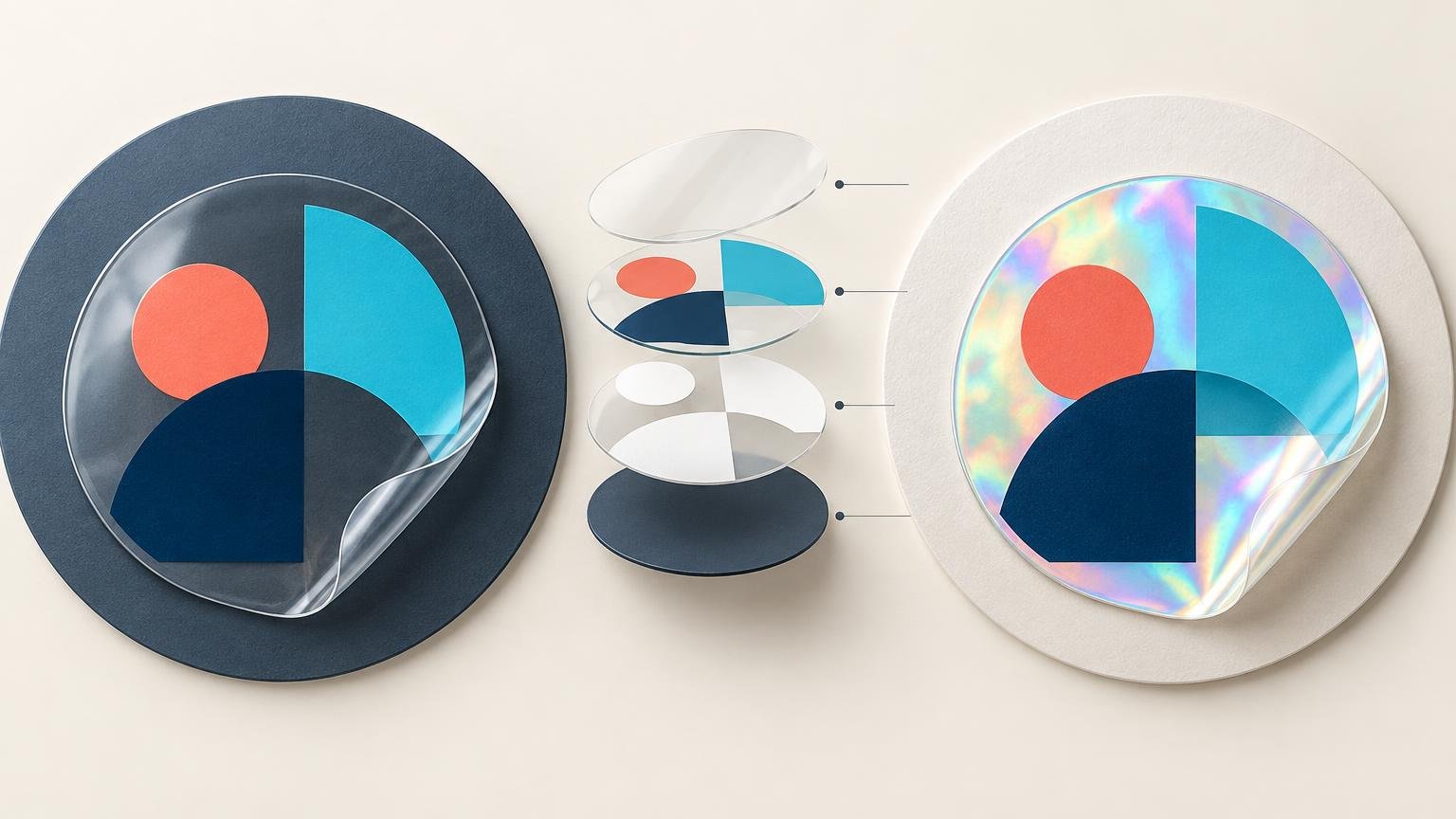
Choose clear stickers when the object beneath the sticker should remain visible and feel like part of the design. Choose holographic stickers when a shifting rainbow reflection is an intentional visual feature. In both cases, the decisive artwork choice is where to print white ink: white can support solid color, appear as visible white artwork, or be omitted so the specialty material shows through.
Do not decide from the artwork file alone. A transparent PNG, PDF or SVG only identifies unprinted areas in the file; it does not specify whether the physical sticker will be clear, holographic or opaque white vinyl. The selected stock and white-ink treatment determine the result.
Clear and holographic vinyl solve different design problems
| Decision | Clear vinyl | Holographic vinyl | Better choice when |
|---|---|---|---|
| Unprinted areas | Reveal the application surface | Reveal the shifting holographic material | The visible surface or effect supports the design |
| Color without white ink | Can remain translucent and mix visually with the surface | Allows the holographic reflection to influence the color | Variation is acceptable or intentional |
| Color over white ink | Gains opacity and separation from the surface | Masks more of the holographic effect | Brand colors, small type or images need greater visual stability |
| Visible white artwork | Requires printed white ink | Requires printed white ink | White elements must remain visible rather than becoming material windows |
Clear vinyl is the quieter option. It works well for window graphics, packaging and products where the sticker should look integrated with the object rather than placed on a white patch. CustomStickers describes its clear product as clear vinyl with white ink beneath printed portions, while cautioning that transparent stickers are not as bright as white vinyl because translucent ink can differ from the screen image.
Holographic vinyl is more assertive. YouStickers describes its material as iridescent rainbow vinyl that changes with light and viewing angle. Its optional spot-white treatment can keep selected parts of the artwork more solid while leaving other areas open to the holographic effect.
White ink is a design layer, not a minor production setting
On clear stock, white ink can perform two jobs. It can print visible white lettering or shapes, and it can sit beneath colored ink as an underprint. That underprint increases separation between the color and whatever lies behind the sticker. Without it, pale colors, fine details and low-contrast artwork may become difficult to read once the sticker is applied.
The same logic applies to holographic stock, but the creative tradeoff is different. Printing white beneath a colored area suppresses more of the rainbow effect. Omitting white allows the material to participate in that color. A practical design often uses selective white: solid support beneath a logo, face or small type, with unprinted or unsupported areas reserved for holographic accents.
Do not interpret a white object on the screen as proof that white ink will be printed. On specialty stock, an unprinted white-looking area in the artwork may become a transparent window or exposed holographic material. The production proof should explicitly show the white-ink layer, cutline and finished scale. YouStickers also notes that its clear-sticker white ink is not completely opaque, so some translucency may remain.
Treat the application surface as part of a clear sticker
A clear sticker does not have one fixed appearance. Place the same print on white glass, a black bottle and brushed metal, and the surrounding contrast changes. Dark, colored, metallic, frosted, textured and curved surfaces can all affect the visible result. If the final surface is unknown, clear vinyl is a risky choice for color-critical artwork unless substantial areas receive white underprint.
Holographic material introduces variation of its own. Its appearance changes with lighting and viewing angle rather than with the background alone. That movement is the point, but it also means a static screen preview cannot represent every appearance the sticker will have.
A worked white-ink plan
Consider a design containing a dark-blue logo, small white type and a transparent star-shaped accent. On clear vinyl, place white underprint beneath the blue logo, print the white type as actual white ink, and leave the star unprinted so the product surface remains visible. On holographic vinyl, support the logo and type with white, but leave the star without white so the rainbow material becomes the accent.
If the dark-blue logo must look nearly identical across bottles, laptops and packaging, an opaque white-vinyl product may be the more predictable decision. Conventional custom sticker options avoid making the application surface or holographic reflection part of every color judgment. CustomStickers lists its standard custom vinyl stickers as white-vinyl products with matte or gloss choices and an online proofing process.
Use the proof for structure and a sample for appearance
A calibrated display and color-managed workflow can reveal some gamut and separation problems. Adobe notes that some bright RGB colors have no direct CMYK equivalent, and its printing color-management guidance recommends calibration and soft proofing for the intended output condition. That is useful preparation, but it is not an exact simulation of translucent ink, selective white, reflective holographic vinyl, laminate or the final application surface.
Use the digital proof to approve spelling, scale, cutline, placement and the intended white-ink mask. Use a physical sample on the real surface, under realistic light, for a color judgment that matters. This is especially important for brand colors, skin tones, delicate gradients and small reversed type. For a broader explanation of this mismatch, see why sticker colors can look different on screen and in print.
Choose the product and compare the complete order
For a clear design that depends on controlled white underprinting, start with the CustomStickers clear-sticker specification and make the desired white mask explicit. For a design built around selective rainbow effects, the YouStickers holographic-sticker option directly supports spot white behind selected artwork. These are workflow-based recommendations, not a claim that either vendor has superior color accuracy or durability.
Request quotes for the same finished size, shape, quantity, finish and artwork treatment. The retrieved configurations each showed an entry quantity of 50, but their displayed prices do not establish which order costs less when dimensions, shipping, destination, tax, rush service and artwork choices can change the final total. Compare the complete delivered totals shown for your actual configuration rather than two starting prices.
The final preflight check
- Confirm the exact quantity, finished dimensions and whether the size refers to the longest or widest dimension.
- Mark every area that requires visible white ink or white underprint.
- Identify the regions intended to reveal the surface or holographic material.
- Check the cutline at finished scale, especially around small type and narrow transparent gaps.
- Review the proof for white-layer placement, not just the full-color preview.
- Order a small physical sample when color, translucency or holographic balance is important.
- Apply that sample to the real surface and inspect it under the lighting in which it will be used.
- Compare matched delivered totals before approving the production order.
The simplest decision is also the most reliable: choose clear when the application surface belongs in the composition, and choose holographic when shifting reflection belongs in it. Then specify white ink deliberately. If you cannot point to which areas should stay solid and which should reveal the material, the artwork is not ready for approval.
References
- Clear Stickers: How to Use White Ink Correctly – CustomStickers.com
- Printing with color management in Illustrator | Illustrator
- How to print color separations in Illustrator | Illustrator
- Clear Stickers vs White Vinyl Stickers: Which Should You Order? – YouStickers
- Clear Stickers | High Quality Transparent Stickers | CustomStickers.com
- Holographic Stickers – Premium Rainbow Hologram Vinyl
- Transparent Backgrounds for Stickers: When You Need One and How to Make It – YouStickers
- Custom Vinyl Stickers | Waterproof and Durable – CustomStickers.com
- Clear Stickers – YouStickers
- Make colors printable or web safe in Illustrator | Illustrator